CSE 528 - Computer Graphics
TEACHING ASSISTANT
TBD. Please refer to
Brightspace.
SPECIFICATIONS ON HOMEWORK
-
Language, Library And Build System.
All programming tasks must be completed using
either C/C++ or Python,
with the help of
OpenGL.
-
For C/C++:
(1) You must use
GLFW
as the designated window toolkit,
and
GLAD
as the loading library.
The use of alternative window toolkits or loading libraries is strictly prohibited.
(2) The designated build system for your program is
CMake.
It is imperative that your CMakeLists.txt script
modifies nothing outside your submission directory.
All desired functionalities for submission should be integrated into a single program.
The resulting executable must be named hwx,
where x represents the homework number
(e.g., hw1, hw2, etc.).
-
For Python:
The designated wrappers are
PyOpenGL and
pyGLFW.
The use of alternative wrappers is strictly prohibited.
Furthermore, the entry module of your program
should be named main.py.
It is also imperative that your program
modifies nothing outside your submission directory.
-
Program templates will be given for all programming parts in our homework;
please refer to the "RESOURCES" section at the end of this page.
Note that these templates are for your convenience and reference only.
Please feel free to start from scratch
(i.e., not utilizing these templates.)
However, you should still observe the user interface
(keyboard and mouse functionalities) as specified in our manuals.
-
Submission.
Please compress your contents into a zip file
sbuid_hwx.zip,
where
sbuid is your 9-digit SBU ID,
x is 1, 2, ...,
and submit via Brightspace.
Note: All names are case sensitive.
Please include:
-
A pdf file named
hwx.pdf
(where x is 1, 2, ...),
which consists of your answers to the non-programming questions.
This file should be formatted by LaTeX,
or converted from other document editors, e.g., Microsoft Word.
This file must not contain any handwritten stuff, e.g.,
photos/scans of figures, tables, graphs, math formula, etc.
-
A README file (in Markdown format) for your program:
-
Format requirements: Please follow the program templates;
-
You are responsible for resolving any discrepancies
between your README and your program.
Please ensure that all your implemented features are checked with "x"s in the README Markdown table.
Only features that have been checked will be considered for grading.
-
Your source code.
Please do not include anything not mentioned above, especially (including but not limited to):
-
Dependencies.
Note that libraries
(e.g., GLFW, GLM, etc.)
are dependencies and
they should not be included directly in your project.
As an exception, GLAD
should be included in your project
as it is designed to be used this way;
-
Temporary files
(e.g.,
CLion's cmake-build-debug directory,
etc.);
-
IDE-specific project files
(e.g.,
CLion/PyCharm's .idea directory,
Visual Studio Code's .vscode directory,
etc.);
Note that some of these stuff are hidden by default,
but they do exist and should not be submitted!
-
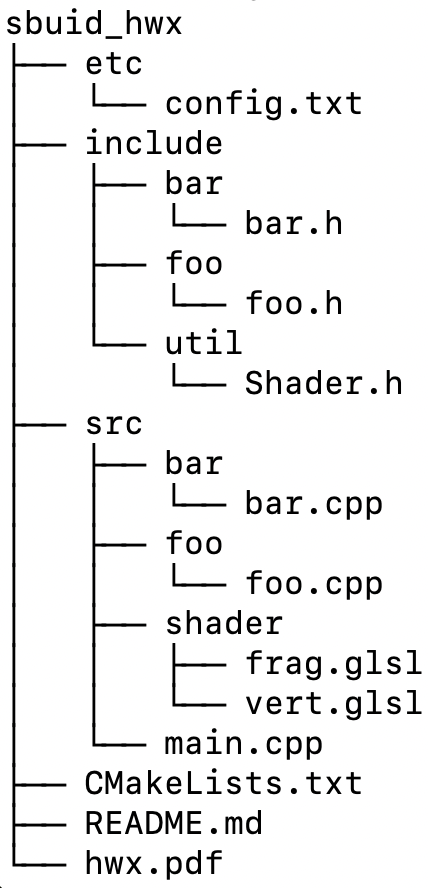
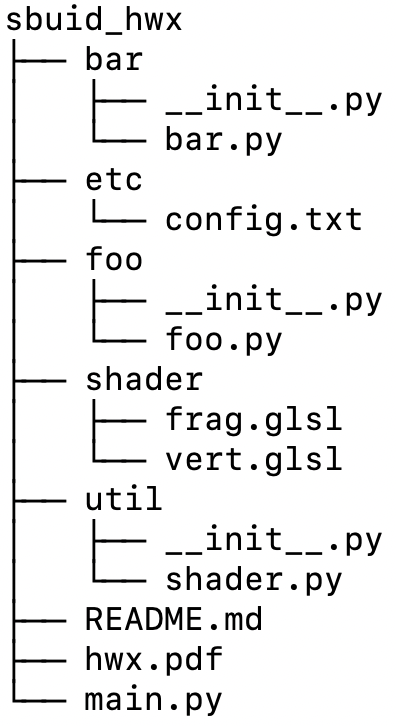
Structure Requirements.
After extracting the contents of the zip package,
your submission directory should adhere precisely to the specified structure below.
Here, all names are case-sensitive.
The TA will unzip your submission file in the Terminal with command
"
unzip sbuid_hwx.zip" (without the quotes),
where, as mentioned above,
sbuid is your 9-digit SBU ID, and
x is 1, 2, ...
Following the extraction, all your files must be consolidated within a single root directory
named sbuid_hwx.
It is crucial to avoid unzipping them into the parent directory
(i.e., the directory which contains your zip package).
-
For C/C++:
-
For Python:
-
You have the flexibility to include as many headers and source files as needed.
The inclusion of
foo and bar
is just for example and is not enforced.
Additionally, you are permitted to create subdirectories to organize your source files. E.g., you could create an etc directory for configuration files
and a var directory for temporary files.
You could also consider placing your shader files in src/shader/ (for C/C++) or shader/ (for Python).
-
Platform.
Testing of your submission will be conducted on a VMWare guest OS
(ubuntu 20.04.1 amd64 desktop) with OpenGL 4.1 in core-profile mode (modern OpenGL).
It is essential to refrain from using deprecated functions in immediate mode (legacy OpenGL).
It is your responsibility to ensure that your code compiles and runs on the specified testing platform.
To minimize compatibility issues, it is highly recommended that
you complete the programming parts within the VMWare VM provided under the "RESOURCES" tab below.
-
Testing.
Your TA may compile and run the release build of your program
in the root of your submission directory, i.e.,
sbuid_hwx,
with the following command(s) (without the quotes):
-
For C/C++: "
cmake -Bbuild -DCMAKE_BUILD_TYPE=Release; cmake --build build; ./build/hwx";
-
For Python: "
python main.py" (in a conda environment).
You will be responsible for any incompatibility with the aforementioned commands,
e.g., shader file not exist error due to improperly-coded shader path.
-
Penalties. Penalties are given as follows:
-
For infractions against the general requirements outlined above,
penalties will be imposed based on the specific circumstances;
-
Penalties for violations of the same requirement will be doubled for subsequent instances.
For example, a deduction of 10% will apply for the first occurrence,
increasing to 20% for the second violation, and so forth;
-
Late penalties will be administered in accordance with
the guidelines established on the main course website.
RESOURCES
-
VMWare Virtual Machine (The Designated Environment for All Programming Parts in Our Homework):
-
VMWare Hypervisor Software. First, please download and install VMWare Workstation Pro (for x84-64 platforms)
or VMWare Fusion Pro (for ARM platforms, e.g., Apple MacBooks) from
Broadcom.
-
VM File.
Please then download the VM file of your architecture from Brightspace.
Please download the correct version (x84-64 or ARM). Your VM will not boot if you use an incorrect version.
-
This VM has all dependencies properly installed:
-
For C/C++: Please simply use the system environment.
-
For Python: Please use the conda environment named "py3".
-
Password for the "student" account is "123456" (without the quotes).
-
Templates for Programming Parts in Our Homework:
-
OpenGL Demo Code:
-
Tutorial Slides:
-
Archive (From Previous Semesters):