CSE
566 Virtual Reality
Spring
2026
Prof.
Arie Kaufman Matthew
Castellana Yoonsang Kim
Assignment
2: 3D User Interface (20% of final grade)
Due
date: Monday, March 2, 2026, 11:59 p.m. (Stony
Brook Time)
In this assignment, you will be exploring 3D user interfaces (3DUI) for interaction with objects in your virtual world. Similar to Assignment 1, you will have to set up a simple 3D virtual world. Additionally, you are expected to design an interface to allow the user to navigate through your virtual world and to ‘pick up’ and ‘release’ 3D objects. We strongly recommend that you meet the following minimum hardware requirements for this assignment:
● A Meta Quest or equivalent headset, or…
● Google Cardboard (or similar), with…
o
A mobile
device with either Android version 6.0 or higher or iOS version 13.0
or higher (note that for later assignments you might need a higher version of
the OS), and…
o A controller connected to your phone using either Bluetooth or USB with 4 menu buttons and directional buttons / joysticks (e.g., Shanwan controller)
The number of buttons and mapping of keys may differ for every controller, but you must still meet all the requirements mentioned in this assignment.
Overview
For this assignment, we will reuse the virtual campus you created in Assignment 1. However, you are asked to include additional 3D objects, such as birds, trees, and fruits, explained below in detail. The objective of this assignment will be to create a 3DUI application where a user will have to navigate through the campus, using a controller, and interact with the birds by feeding them fruits. The user will also be provided with two types of interfaces: one that triggers a minimap (World In Miniature - WIM) to visualize the location of the user within the campus, and second, to allow the user to check the list of fruits each bird prefers. Lastly, the WIM must support the functionality of ‘teleportation.’
As mentioned before and outlined in the syllabus, this assignment involves an additional hardware component, a controller. We strongly advise you to start early and spend some time thinking about how you will implement each feature of the assignment.
The detailed description of each component of the assignment is
described in the following sections. Extra functions and extra credits are
mentioned at the end of the description (before “Submission”). During this
assignment, you are allowed to download models from the Unity Asset Store, or
any other source, provided you have permission to download them and cite each source properly in your
documentation.
Scene design
You will be reusing the virtual campus you
created in Assignment 1, with the addition of the following scene objects
and/or functionalities:
●
Trees:
You have to add at least 10 trees in the scene of at least 5 different types. For example, 2 x trees / type = 10 trees in total for 5 types. Each tree type can be differentiated any way you prefer: such as by color or
shape, or any distinctive feature. Note: make sure you list the distinctive
features in your report so that the grader can clearly identify this
requirement.
While you can place the trees anywhere in the scene, they should be at least 1m
apart from each other (to avoid scene clutter and allow a smooth user
experience for interaction and navigation).
●
Fruits:
Each tree type must have a kind of
fruit attached to it. Naturally, only a single type of fruit can grow from a
type of a tree. There must be at least 3 fruits on every tree. And each
type of fruit must have a distinct color. An example of a tree and its red
fruits are shown in Figure 1.
●
Hot air balloon: You need at least 1
hot air balloon in the scene. The hot air balloon is used to facilitate
virtual navigation. It will enable the user to teleport to any location within
the map while the user is riding it.
●
Birds:
You need at least 5 birds in the scene. In the application, each bird will feed
on a particular type of fruit. Therefore, design each bird such that its color
matches the color of the fruit the bird needs to be fed. The birds can be located
anywhere in the scene, with starting position in the air, on the ground, or on
an object, however, they should move in a constant motion (loop motions) along
different predetermined trajectories (see bird feeding zones below for
more instructions on designing the bird path). The bird paths must not collide
with the trees and must fly at least 0.25m away from the fruit trees.
●
Bird feeding zones: The goal of this application is to feed fruits to their birds. Since
the birds are in constant motion, it may be difficult for the user to know
where/how to feed them. You will have to create at least 5 different feeding
zones with colored signs to indicate to the user the zones where each kind
of bird flies-by and can interact with them and feed them with fruits. The zone
color must correspond to the color of the bird which will enter the zone. Each
zone must have a transparent colored bubble around it for a clear
indication of its corresponding bird. Thus, as you are defining the path of the
birds, make sure that each bird passes through its respective colored feeding
zone at least twice during every flying loop motion.
● User character: You need to include a 3D virtual character that represents the user for enhanced immersion. In first-person-view, the user must be able to see their hands when interacting with the trees and the birds.
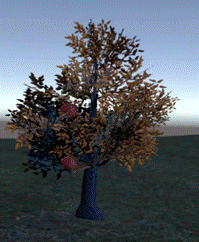
Figure 1. Example of an apple tree with (red) fruits.
User interface
We will implement two types of user interfaces: a minimap interface that provides the locational information of the user in the virtual campus, and a checklist interface that indicates the tasks the user needs to perform.
Minimap
A minimap is a shrunk-down version of the virtual scene. It is often placed at a screen corner in VR applications and video games and to aid players/users in orienting themselves within the virtual world (see Figure 2). You need to provide a minimap to the user. The minimap can be toggled with a press of a button on your controller.
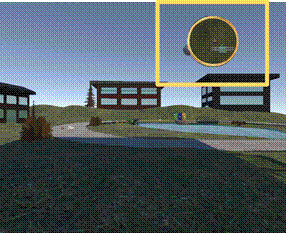
Figure 2. Example of in-game minimap shown with yellow square (Left).
Enlarged view of the minimap (Right)
Checklist
You will have to design a checklist for the application that shows a ‘To-Do list’ of the user. It should show the type and the quantity of the fruits that the user needs to collect for the birds. You should allocate another button on your controller, to toggle the checklist. The checklist must be able to be shown to the user anytime with a button press. And the list is updated as you collect or feed the birds. You can design your own checklist, but it must include at least 5 distinct fruits, and at least 2 of each type of fruit. An example of the checklist is shown below:
Bird feeding
checklist
Apple x 3 (Red)
Pear x 2 (Yellow)
Fig x 2 (Orange)
Grape x 3 (Green)
Strawberry x 2 (Blue)
Navigation
You will be implementing a functionality for the user to walk around the campus using the controller as well as allowing the user to teleport to any location in the scene.
Walk mode
The user can freely walk around the campus along the x-axis (left/right) and the z-axis (up-forward-up/down-backward). You can determine the mapping of the keys. Figure 3 demonstrates one possible mapping of these keys. The directional buttons/joystick are used to control the navigation.
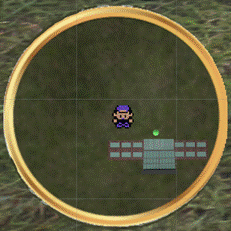
Figure 3. Example mapping of
navigation keys and interaction buttons.
Teleportation
Walking back and forth between the trees and the bird feeding zones can
be tiring. We will implement a teleportation function for users to “jump” from
one location to another, at once. The air balloon(s) will be used to support
this functionality. The user is able to hop onto the closest hot air balloon
with a button press of your controller, and get off with the same button. Once
the user is on the hot air balloon, an enlarged version of the Minimap is
displayed to the user, and the user is able to select the desired teleportation
location with the directional buttons/joystick on the controller, and a button
press. Once the selection is complete, the hot air balloon “carries” the user
and teleports the user to that location.
Camera views
In this assignment, you will have to implement a “first-person view”. That is, the view of the camera shows the scene from the user’s eyes perspective. For a better immersive experience, the first-person view will also have to show the user’s hands or the controller held by the user.
For extra credit you can implement an
additional “third-person view.” In
this view, the camera should be placed behind your avatar (3D user character),
but we still should be able to see upfront, including your avatar within the
scene. The user should be able to toggle between the two modes anytime using a
button on the controller.
Scene interaction
The main theme of this assignment is selection and interaction. The user is given a task to collect the fruits from the trees, and feed them to the birds at the feeding zone. Below are the details of the tasks:
●
Fruit collection: The user must collect all the fruits from the trees based on their
checklist. Since each tree has a unique kind of fruit, the user has to navigate
to each tree to collect them. A fruit is collected when the user gazes at the
fruit in the vicinity of a tree and presses a button. While you can keep track
of the fruits collected using the checklist, you can get extra credit if
you display some kind of interface, such as icons or a “virtual basket” which
fills up as you pick the fruits.
● Bird feeding: Once the collection of fruits is complete, the user must navigate to the bird feeding zones to feed the birds of different kinds. Once the user enters a feeding zone bubble, the user has the option to feed the corresponding colored fruit to the corresponding colored birds. With a press of a button, a fruit will automatically be placed onto the hand of the user (shown on the hand in first/third person view), and the corresponding bird can fetch it. You may assume that the correct type of fruit is automatically drawn from the user’s fruit collection (as the user has completed the fruit collection beforehand) when the user triggers the interaction. The fruit will disappear from the user’s hand once the bird fetches the fruit. The bird can only fetch the fruit from the user when it enters its colored feeding zone bubble. Note that each fruit color corresponds to the birds the user needs to feed to and the corresponding feeding zone for those birds. For extra credit, you may design a gaze selection method where the user gazes at the correct fruit in the basket to place it on their hand.
Three extra credit
functionalities/features are listed in the assignment write-up above. The extra
credit is an additional 10% of the assignment value towards the final
grade. Please describe the extra functionalities and/or features in your report.
The extra credit points will be evaluated based on the completeness of
implementing the extra credit tasks.
Submission
It is strongly recommended that you test your
application before submitting your work. Please save and zip your Unity
project in a folder named “CSE566 Assignments” in Google Drive and enable the share of this folder rather
than sharing the single project file. In Brightspace submission, please submit
the link to your Google Drive folder.
For this assignment, include the following
for full credit: your
Unity project folder, a report, and a video. Your Unity project folder should
contain your Unity saved scenes and all
your Scripts and Assets that will be required to rebuild your project. Please
do not include your project executable in the folder. You will also need to upload video recordings for your application, such as using the Meta Quest screen
recording functionality. Make sure you show all
aspects/functionalities of the assignment,
including but not limited to the scene objects and the interactions, and the
video recording should make it clear that you are actually running VR.
For your
report, you should include at
least the following:
- A
title: “CSE 566 Virtual Reality, Spring 2026, Assignment 2: 3D User Interface”
- Your
name and Stony Brook ID
- Any
extra functionalities/ features that you implemented for this assignment
- Details
on implementation: references to the downloaded 3D models or how you designed
your own model; how the motion paths in your scene were implemented; how the
scene transition was implemented for switching between the modes, to mention
but a few.